Sync to Nautobot
Everwas can feed Nautobot as a system of record: a scheduled SSoT job sweeps the sync API and lands the fleet in Nautobot — endpoints and interfaces through the diff, and software, patch state, and per-check security posture as bitemporal beliefs, so “what did Nautobot know last Tuesday” stays answerable there too. The sync is one-way on purpose: Everwas is authoritative for what its own agents report, and nothing in Nautobot writes back.
This guide assumes a working Everwas server and a Nautobot 3.x instance you administer.
Install the Nautobot apps
Section titled “Install the Nautobot apps”Two apps, split deliberately: nautobot-rmm-models carries the models,
the vendor-neutral diff layer, and the bitemporal recorders, shared with
every other RMM source; nautobot-ssot-everwas is the thin adapter that
maps the Everwas sync API onto them.
pip install nautobot-rmm-models nautobot-ssot-everwasEnable all three in nautobot_config.py and run migrations:
PLUGINS = [ "nautobot_ssot", "nautobot_rmm_models", "nautobot_ssot_everwas",]The adapter needs nautobot-rmm-models at or past its first release
after 2026-07-22 — that release carries the Everwas vendor choice and
the RMMPostureCheck per-check posture model the sync records into.
Mint a scoped key
Section titled “Mint a scoped key”In Everwas, mint an API key with the devices:read scope, plus
patches:read if you sync patch state (admin UI, or
POST /api/v1/admin/api-keys). The key looks like
ewpk_<id>_<secret> and is shown once.
The job exchanges that key for a short-lived ewst_ bearer token
(RFC 6749 client credentials against /api/v1/auth/token) and
re-exchanges on expiry — you never handle tokens yourself. Revoking the
key invalidates its outstanding tokens immediately, so rotation is
instant: mint the new key, update the secret, revoke the old one.
Point Nautobot at Everwas
Section titled “Point Nautobot at Everwas”- Create a Nautobot SecretsGroup with an HTTP password secret
holding the whole
ewpk_key. (The HTTP username slot is optional, only for OAuth2 tooling that insists on a split client_id/client_secret pair; the sync API accepts the whole key asclient_secretalone.) - Create an RMMSource with vendor Everwas, attach the
SecretsGroup, and set
base_urlto your Everwas server. The URL is required — Everwas is self-hosted and there is no default.
Credentials are never a job field, which is what lets the job be
scheduled. If a SecretsGroup is impractical, EVERWAS_API_KEY in the
worker’s environment is the fallback.
Run the job
Section titled “Run the job”Run Everwas → Nautobot under Jobs. Dry-run first: it prints the full diff without writing anything. The defaults are safe — the sync is additive-only unless you switch on Delete records missing from Everwas, and even a delete run refuses to proceed when the source returns less than half the endpoints already known, because a drop that steep is a failed fetch, not a fleet shrink.
Toggles worth knowing on the first run:
| Toggle | Default | Notes |
|---|---|---|
| Sync installed software | on | Name+version only; that is all the agent collects today |
| Sync OS patches | on | Needs patches:read on the key |
| Sync security posture | on | Per-check verdicts into the posture belief log |
| Record endpoint readings | on | Online/offline from device status, no extra sweep |
| Include retired devices | off | The feed includes them by contract; importing them into an additive-only sync would accumulate decommissioned machines forever |
| Link to Tenants / Locations / Devices | on | DCIM enrichment, gated further per device class (below) |
The job is built for fleets: four paged API sweeps total, zero per-device calls, and backoff on errors bounded by a wall-clock budget.
What a sync produces
Section titled “What a sync produces”Organizations become Tenants, sites become Locations, and each device
becomes an RMMEndpoint with its interfaces, all reconciled through
the diff. Software installations, patch state, endpoint readings, and
security posture are recorded as beliefs on two axes —
valid time for when it was true on the machine,
record time for when the sync learned it — the
same bitemporal model Everwas keeps, preserved
across the wire.
Posture is per-check rather than a rollup: one row per
(endpoint, check), so disk-encryption, firewall, and antivirus
each carry their own verdict and history.
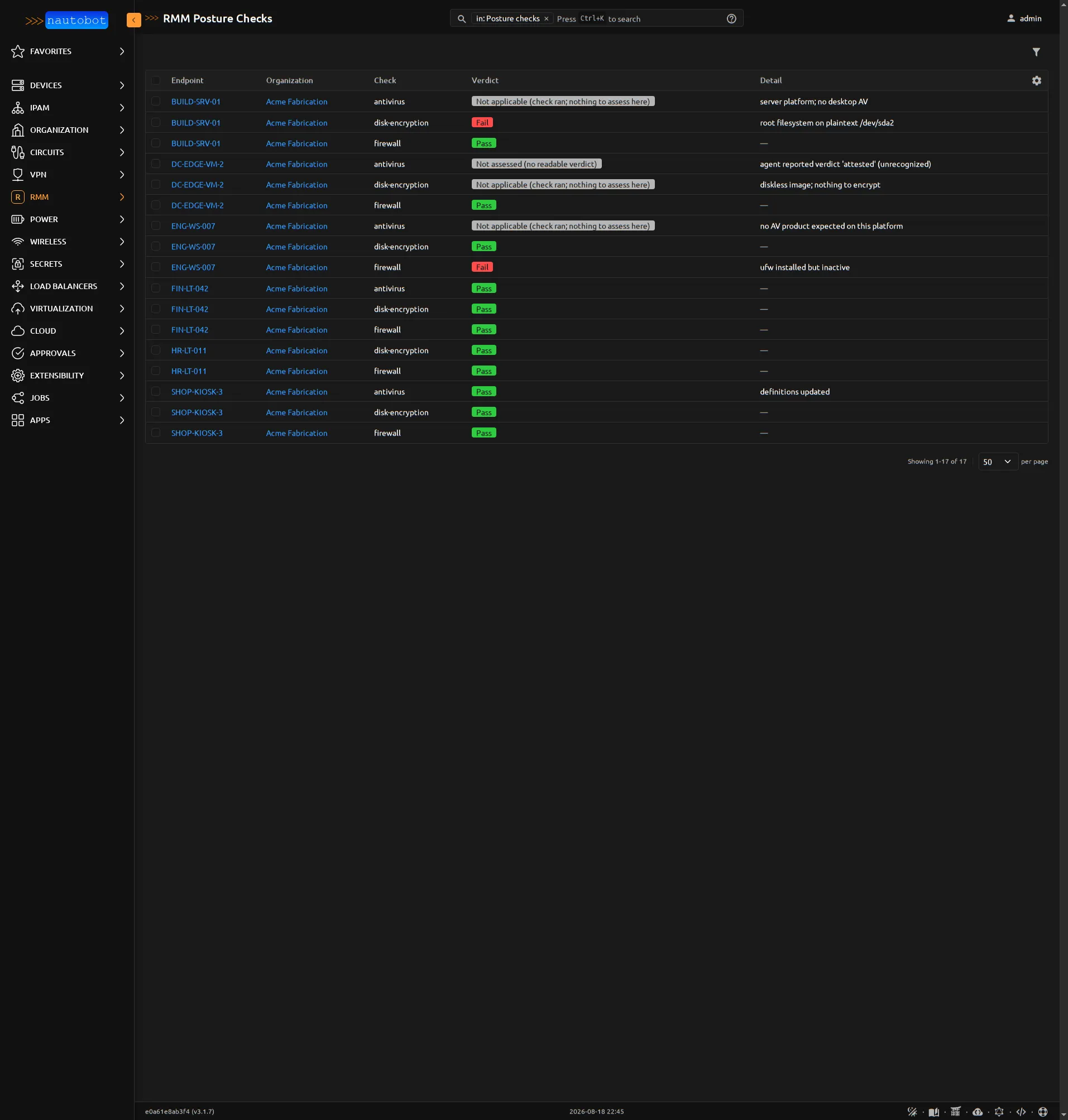
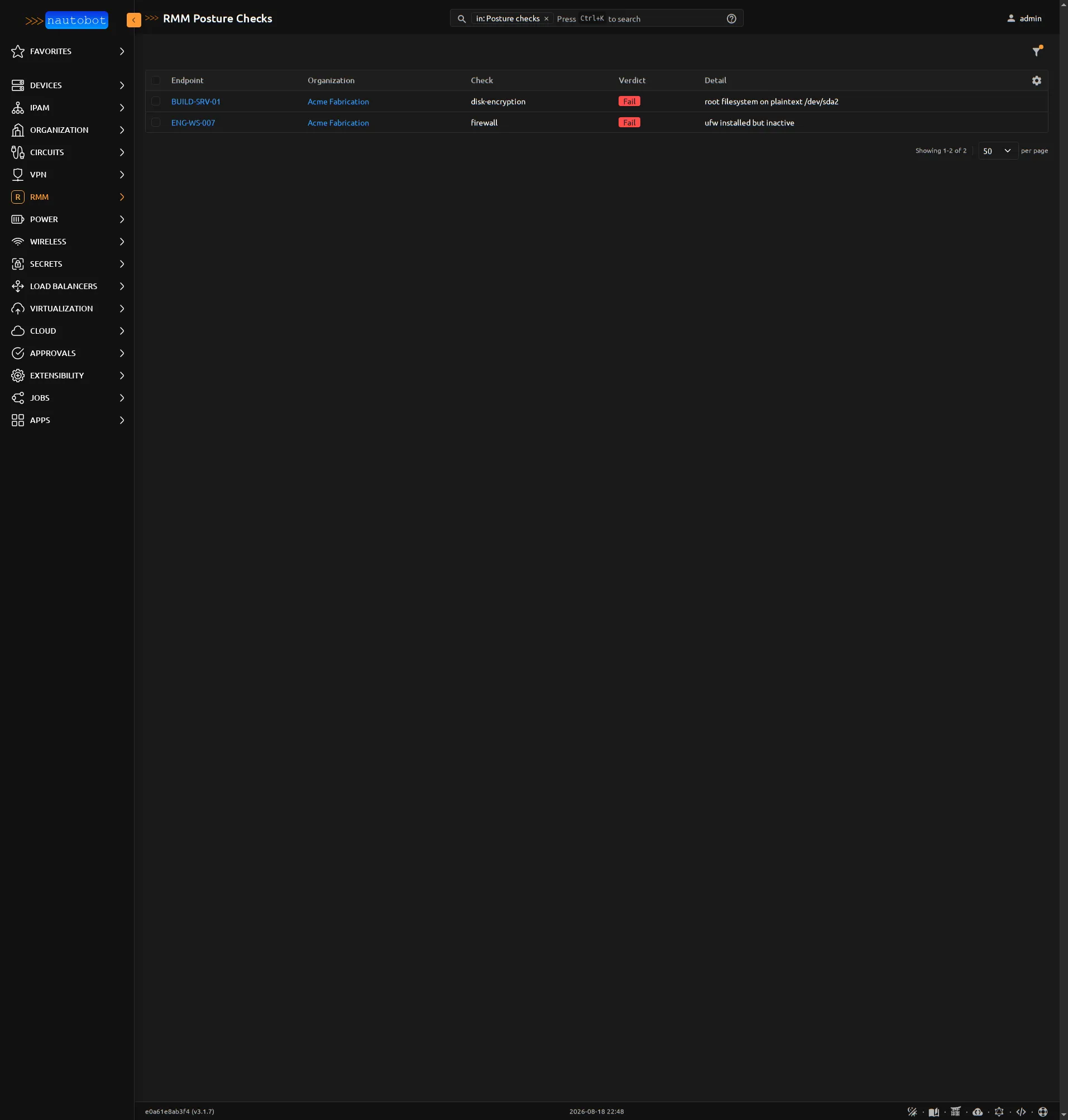
That rule is why the posture list’s ?failing=true filter is strict —
explicit fails only — and it is the same set behind the failing-checks
tile on the Fleet Console (RMM → Console), which is the fastest
route from “did the sync find problems” to the machines that have them.
Optional: DCIM enrichment
Section titled “Optional: DCIM enrichment”With linking enabled, endpoints whose vendor_class (laptop, desktop,
server, …) appears in the source’s device_creation_node_classes
allowlist are promoted to dcim.Device records — the allowlist is
empty by default, so nothing is created until you say so. Virtual
machines are deliberately never promoted: the agent inside a guest
knows it is virtualized but not what it runs on, so inventing a Device
(or a placeholder Cluster) would manufacture topology your hypervisor
SSoT actually owns — run that first, and this sync links to the
VirtualMachines it created.
Promoted devices get interfaces with MACs, and because Everwas reports
addresses in CIDR form (192.0.2.10/24), the enrichment derives real
IPAM: a Prefix per network, an IPAddress per interface address, and a
primary IPv4 on the Device if it has none.
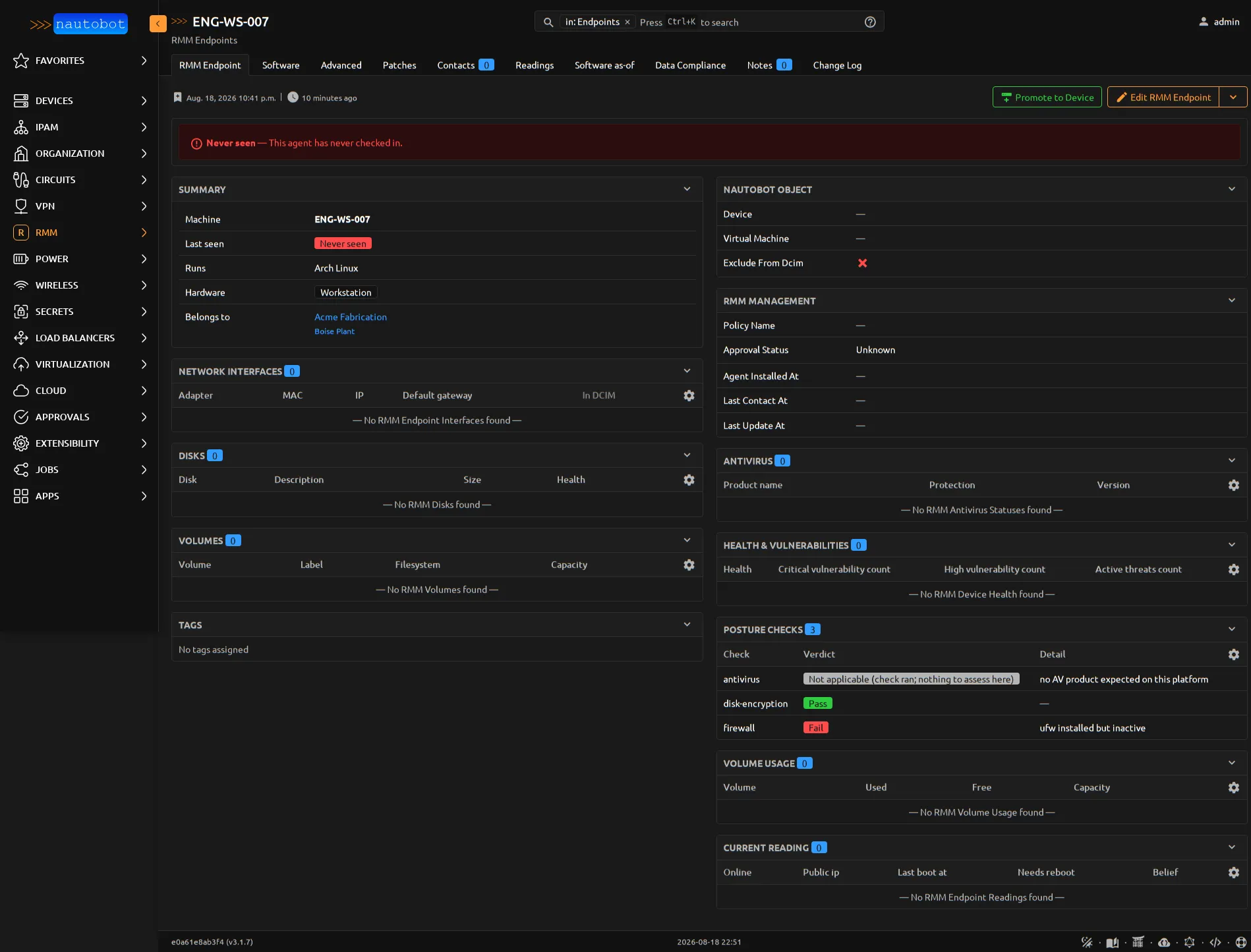
Each endpoint’s detail page shows the linked DCIM objects alongside its current posture, software, and patch panels:
Verify it worked
Section titled “Verify it worked”Run the job a second time, immediately. The second run should report no changes: same sweeps, same diff, nothing to create or update. If it reports differences on back-to-back runs, something is flapping — usually a volatile field that should not be diffed, which is worth a bug report.
Then spot-check the three surfaces: the endpoint count under RMM → Endpoints matches your fleet (minus retired devices), a device you know well shows its software and patch state, and the Fleet Console failing-checks tile agrees with the Everwas security view.
Scheduling
Section titled “Scheduling”Nautobot’s job scheduler runs the sync on whatever cadence suits you; because credentials live in the SecretsGroup rather than the job form, a scheduled run needs no stored secrets of its own. Hourly is a comfortable default — each run is a handful of paged sweeps, not a per-device crawl, so frequency is cheap.